

Android Auto Update: Dolby, 3D Maps & Gemini AI
A few years ago, Android Auto was considered a premium feature — something you'd find in higher-end variants or luxury cars. Today? If a mid-range car doesn't offer it, buyers genuinely think twice. That shift says a lot about how deeply connected we've become to our smartphones, even behind the whe...
A few years ago, Android Auto was considered a premium feature — something you'd find in higher-end variants or luxury cars. Today? If a mid-range car doesn't offer it, buyers genuinely think twice. That shift says a lot about how deeply connected we've become to our smartphones, even behind the wheel.
And now, Google has rolled out what is arguably one of the most meaningful Android Auto updates in recent memory. We're talking about three big additions: Dolby audio integration, a completely redesigned 3D maps experience, and the arrival of Gemini AI as an in-car assistant. These aren't just interface tweaks — they're changes that could genuinely shift how you experience time in your car.
Here's the thing. If you commute regularly in Bengaluru, Mumbai, or Delhi, you're not just driving — you're spending serious chunks of your day sitting in traffic. That daily grind is exactly why this update matters more for Indian drivers than perhaps anywhere else. Better navigation, smarter assistance, and improved audio aren't luxuries in that context. They start to feel like necessities.
So let's break down what's actually changed, and more importantly, what it means for the road conditions and commuting realities most of us deal with every single day.
Dolby Audio Integration in Android Auto – What It Actually Means for Your Car Speakers
Let's start with the honest version: Dolby integration in Android Auto sounds impressive on paper, but what it actually delivers depends almost entirely on what's already sitting inside your car's doors.
What Google has done here is bring Dolby-tuned audio processing into the Android Auto environment. Think of it as a layer of sound optimization applied to your music stream before it even reaches your car's amplifier. It handles things like dynamic range, spatial clarity, and frequency balancing — the kind of processing that makes audio feel fuller and more defined rather than flat and compressed.
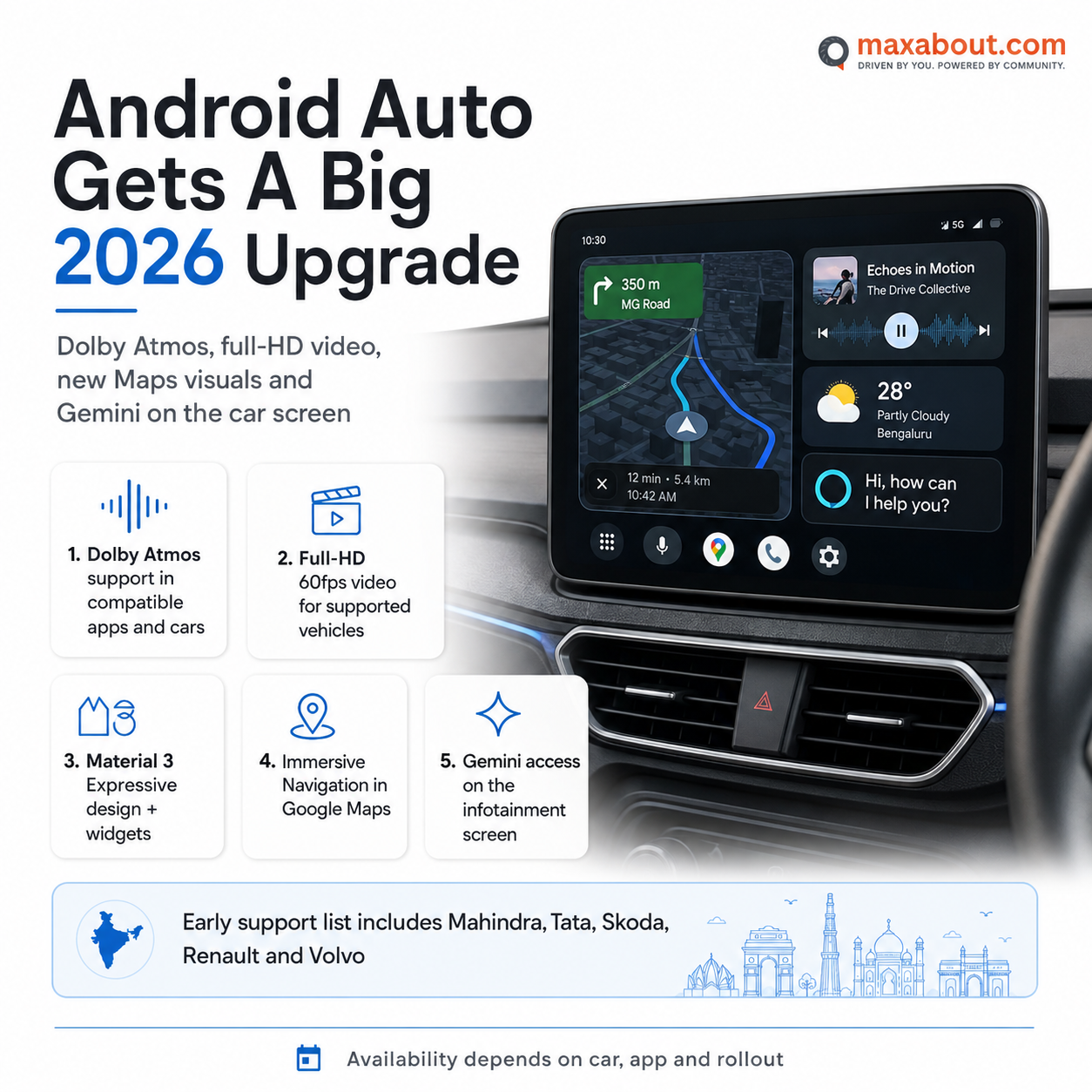 For apps like Spotify and YouTube Music, this could genuinely make a noticeable difference. Streaming audio has always been a compromise, and Dolby processing helps recover some of that lost texture — tighter bass, cleaner vocals, better separation between instruments.
But here's where expectations need to stay grounded. If your car runs a basic stock speaker setup — which describes most entry-level and mid-range segments in India — the improvement will be modest at best. You can only polish what the hardware allows.
Cars equipped with JBL, Bose, or Harman audio systems — found in vehicles like the Tata Nexon, Hyundai Creta, or Kia Seltos at higher trims — will genuinely feel the benefit. Those systems have the amplifier headroom and speaker quality to actually express what Dolby processing unlocks.
So worth it? Potentially, yes — but only if your setup can keep up.
3D Maps on Android Auto – A Game Changer for Indian Roads or Just Eye Candy?
The new 3D map view in Android Auto is genuinely striking at first glance. Instead of the flat, top-down navigation most of us are used to, you now get a perspective view — buildings rendered with depth, roads that appear to slope and curve, and a sense of actual spatial awareness. It feels closer to how you experience a city in real life rather than reading a paper map.
But here is the honest question: how useful is this actually for Indian drivers?
In well-mapped metros like Hyderabad, Pune, or Chennai, the 3D data is reasonably detailed. Complex flyover networks — think Hyderabad's PVNR Expressway or Pune's Katraj junction — can genuinely benefit from a perspective view. Seeing a landmark rendered in three dimensions helps you orient faster than reading a street name you have never heard before.
Outside major cities, though, expectations should stay grounded. Smaller towns and Tier-2 cities still have inconsistent mapping data. A 3D view of incomplete data is not more helpful — it is just a prettier version of the same gaps.
There is also a distraction concern worth raising honestly. Indian roads demand constant attention. A visually rich, animated 3D display could pull your eyes longer than a clean 2D view. On mid-range Android phones, rendering smoothness is another variable — some users have already reported frame drops that make the experience feel rough rather than refined.
Promising feature. Real-world results will vary significantly.
Gemini AI in Android Auto – Smarter Voice Commands While You Drive
This is arguably the most meaningful update in the entire Android Auto rollout. Google has begun replacing the older Assistant experience with Gemini AI, and the difference in capability is quite noticeable on paper — and increasingly in practice.
The core improvement is natural language understanding. Older Assistant was rigid. You had to phrase commands just right or it would misfire. Gemini is far more conversational. You can ask it something like "summarize the last few messages from my brother and reply that I'll be there in twenty minutes" — and it actually handles that as a single, flowing request. For WhatsApp replies specifically, that kind of hands-free control is genuinely useful.
For Indian drivers, there is a very practical reason this matters beyond convenience. Using a handheld phone while driving now attracts serious penalties under Indian traffic law — fines that have been revised upward in recent years. Having a voice assistant capable enough that you actually trust it reduces the temptation to reach for the phone at a signal.
From what early reviewers have reported, Gemini handles Indian English accents reasonably well — better than previous versions. That said, performance with stronger regional speech patterns remains inconsistent.
One honest limitation worth flagging — Gemini depends heavily on a stable data connection. On highways between cities like Pune-Nashik or Bengaluru-Mysuru, connectivity drops are common. In those patches, the experience degrades quickly.
Which Cars in India Support These New Android Auto Features?
Here's the honest answer — it's complicated. Just because your car supports Android Auto doesn't automatically mean you'll get Dolby Atmos, 3D Maps, or Gemini AI from day one. Three things determine your actual experience: your head unit's capabilities, your Android phone model, and which version of the Android Auto app you're running.
Wireless Android Auto gives you a clear advantage here. Cars equipped with wireless connectivity tend to handle app updates and feature rollouts more smoothly. Wired-only systems can feel more restricted, sometimes requiring manufacturer-side software pushes before new features activate properly.
Across popular Indian segments, support levels vary considerably. Compact SUVs like the Hyundai Creta, Kia Seltos, Tata Nexon, and MG Hector generally offer more capable infotainment platforms. Maruti Suzuki's newer models — particularly the Grand Vitara — have improved significantly. Mid-range hatchbacks and entry sedans often run simpler head units that may lag behind on feature support.
Older infotainment systems, even on well-regarded cars, may need official software updates from manufacturers before these features work correctly. That update may or may not arrive quickly — this varies by brand.
A practical first step: open your Android Auto app, check the version number, and ensure automatic updates are enabled. Also confirm your phone runs Android 8.0 or above. These basics matter more than most people realise.
Wireless vs Wired Android Auto – Which Setup Gets You the Full Experience?
This is a question that comes up constantly, and honestly, the answer is more nuanced than most people expect. The short version: wired is still more reliable. But wireless is catching up — with some important caveats.
A wired connection gives Android Auto a stable, consistent data channel. No interference, no pairing delays, no battery drain concerns. When you plug in and the screen mirrors instantly, that consistency matters — especially when you are navigating through dense traffic in Bengaluru or Mumbai and cannot afford a two-second lag while checking a turn.
Wireless Android Auto works beautifully on flagship phones. A Pixel 7, Samsung Galaxy S23, or OnePlus 12 will handle it smoothly. But mid-range Android phones — which most Indian buyers actually use — can struggle. Devices in the ₹15,000 to ₹25,000 range often show noticeable lag, occasional disconnections, or audio sync issues over wireless.
Now factor in Dolby audio processing and 3D map rendering. These are resource-intensive tasks. Over a wireless connection, that added load can push a mid-range processor noticeably harder, sometimes causing stuttering or delayed map redraws.
Practical advice: If your phone is mid-range, stick with wired for the smoothest experience with these newer features. If you are on a flagship and your head unit supports wireless Android Auto, go wireless — the convenience genuinely pays off.
Real-World Usefulness – How These Features Hold Up in Indian Driving Conditions
Theory is one thing. Bangalore's Silk Board junction at 6 PM is another. Let's be honest about how these three features actually perform when Indian roads throw everything at them.
3D Maps – Impressive Until the Detour Hits
The 3D map rendering looks genuinely impressive on a good head unit display. Flyovers, underpasses, complex interchanges — it all makes spatial sense now. But here's where it gets tricky. Indian cities are construction zones in permanent motion. A road that existed yesterday might have a barrier across it today. From what users are reporting, Google Maps' underlying data still struggles to keep pace with these sudden changes. The 3D presentation makes navigation clearer, but it cannot fix outdated map data. So you get a beautifully rendered wrong turn.
Gemini AI – Patchy Data, Patchy Results
Gemini's conversational intelligence depends heavily on a live data connection. On NH highways outside major cities, mobile data becomes unpredictable. Drop to 2G or lose signal entirely, and Gemini effectively goes silent. Basic commands still work offline, but the smart, context-aware responses that make Gemini genuinely useful — those disappear. For city driving, it holds up reasonably well.
Dolby Audio – Nice, But Competing With Horns
In stop-and-go traffic surrounded by honking, the Dolby enhancement becomes almost irrelevant. You will genuinely appreciate it on a quiet highway stretch or early morning drives. That is when the cleaner soundstage and improved depth actually register. Inside city chaos, it is background luxury at best.
Should Android Auto Quality Factor Into Your Next Car Purchase?
Honestly, yes. And I think most buyers underestimate this. Many cars simply list "Android Auto supported" as a spec checkbox and move on. But the actual experience varies dramatically depending on the processor powering that head unit and whether wireless connectivity is included.
With Google continuously pushing updates — Dolby audio, 3D Maps, and Gemini AI integration being the latest — a slow or underpowered infotainment system will simply struggle to keep pace. You end up with a capable software platform trapped inside inadequate hardware. That frustration compounds daily.
Are these three features transformative for Indian users specifically? Partially. Gemini and 3D Maps carry real practical value on unfamiliar routes and highways. Dolby is genuinely enjoyable outside congested areas. None of them are gimmicks, but their full benefit depends heavily on your driving environment and head unit quality.
Before signing any purchase paperwork, run Android Auto live during the test drive. Check response times. Try wireless pairing. See how navigation renders. That five-minute check reveals more than any spec sheet will.
Looking further ahead, in-car technology in India is maturing rapidly. Wireless integration, AI-assisted driving aids, and smarter navigation are moving from premium to mainstream. Choosing hardware that can handle what is coming next is simply a smarter long-term investment.
Maxabout Team
Editorial Team
Specializes in: Automotive News, Reviews, Analysis
Want to read more automotive news?
Stay updated with the latest car launches, reviews, and industry insights.
Browse All News